

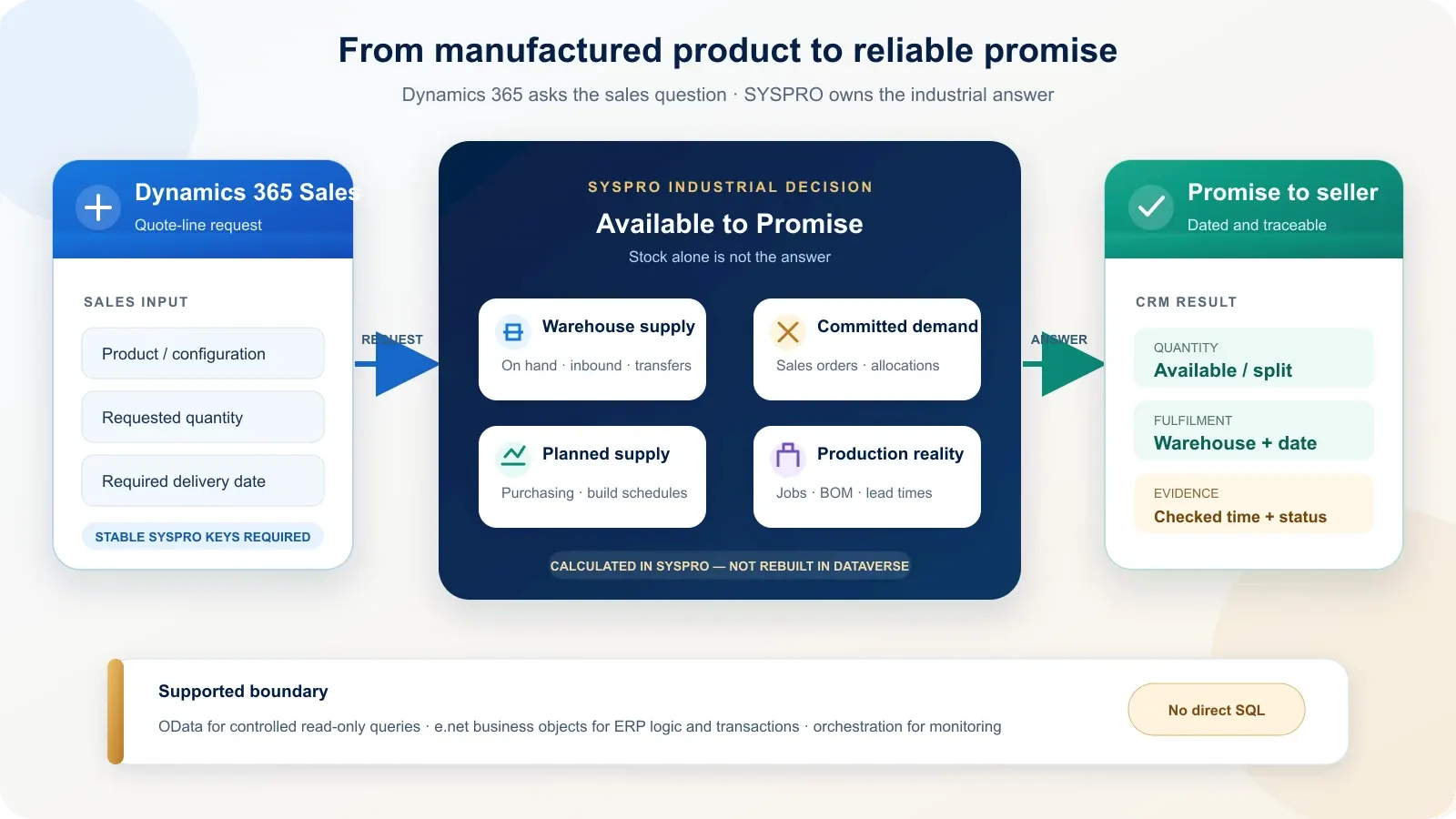
A useful SYSPRO integration gives a salesperson an availability-to-promise answer, not a copied stock number. Dynamics 365 Sales should show what quantity can be supplied, from which warehouse and on what date, while SYSPRO remains responsible for inventory, demand, planned supply, manufacturing jobs and production lead times.
That boundary is specific to a manufacturing and distribution ERP. It makes this project different from a customer-and-order synchronization with Sage 300 or a broad SAP architecture exercise.
What should a salesperson see before promising a delivery date?
The salesperson needs a dated, attributable promise: quantity, warehouse, earliest supply date and the time SYSPRO checked it. A single “in stock” field is insufficient because existing sales allocations, production demand, purchase orders, jobs and transfers can change what is genuinely available for a new customer commitment.
SYSPRO documents an Inventory Available to Promise query for a stock-code and warehouse combination. Its ATP view can include planned supply and demand from sales orders, work-in-progress allocations and supply-chain transfers. The CRM should surface the result needed for the sales decision, not reproduce the calculation.
| Commercial question | SYSPRO evidence | What Dynamics 365 should show | Required freshness |
|---|---|---|---|
| Can this quantity ship now? | Available quantity for the selected stock code and warehouse | Available quantity and warehouse | On request before commitment |
| When can the balance ship? | ATP periods, planned supply and demand | Earliest date and quantity by date | On request, timestamped |
| Can the item be manufactured? | Jobs, material demand and manufacturing lead time | Provisional build date or exception | Rechecked when quantity or date changes |
| Which site can fulfil it? | Stock and supply across authorised warehouses | Eligible fulfilment options | Current enough for the sales rule |
| Has the promise changed? | Allocation, job, purchase-order or transfer movement | Warning and revised date | Event-driven or monitored schedule |
The timestamp matters. An answer checked yesterday is context, not a commitment. Before a quotation becomes an order, the integration should request a fresh decision or require an explicit revalidation.
Why is stock on hand not a delivery promise?
Stock on hand describes physical quantity; availability subtracts commitments, and ATP also considers dated future supply and demand. A warehouse may physically contain units that are allocated to other sales orders or production. Conversely, a future job or purchase order may support a later promise even when today’s available quantity is zero.
For example, 100 units on hand and 90 already allocated can leave only 10 currently available. That still does not answer whether 40 more units can be promised next week: the date depends on planned production, incoming supply, new demand and the warehouse rules applied by SYSPRO.
Multi-warehouse distribution adds another decision. Stock at a second site is not automatically sellable from the first one; transfer time, permissions, replenishment rules and the customer’s delivery route can matter. Dynamics 365 should not merge all warehouse balances into one reassuring but unusable total.
Should production structures be copied into Dataverse?
Detailed bills of materials, operations, component allocations and production jobs should normally remain in SYSPRO. Dynamics 365 Sales needs the commercial consequence of that structure: whether an item can be supplied, the expected date, the relevant configuration, a job milestone and any exception that requires customer communication.
Copying an entire bill of materials into Dataverse creates a second manufacturing model that must be secured, synchronized and reconciled after every engineering or planning change. It also tempts CRM automation to infer a delivery date without the complete planning context.
A deliberately small CRM projection can include:
- the SYSPRO stock code and sellable description;
- make-to-stock or make-to-order classification when useful to sales;
- a configuration or revision label required on the quotation;
- manufacturing lead time as reference information, not a live promise;
- the latest promised quantity, date, warehouse and checked-at timestamp;
- a high-level job or fulfilment status after order acceptance.
SYSPRO’s lead-time calculation can incorporate operations, movement, non-working days and subcontract conditions. A static number copied to CRM must therefore be labelled as reference data and never presented as a newly calculated commitment.
Which SYSPRO interfaces are suitable for the integration?
Microsoft’s connector catalogue does not list a first-party SYSPRO connector as checked on 14 October 2026. The supported route starts with the interfaces available in the customer’s SYSPRO release: read-only OData for controlled queries and licensed e.net business objects, exposed through supported SYSPRO services, for business logic and transactions.
| Interface | Supported role | Appropriate CRM use | Boundary to respect |
|---|---|---|---|
| SYSPRO OData Service | RESTful, read-only access to exposed company and system data | Product, warehouse and reporting queries when required data is available | GET only; licensing, HTTPS and permissions must be validated |
| e.net business objects | SYSPRO business logic for queries, setup and transaction posting | Customer validation, sales-order posting and operations that must obey ERP rules | Required functional areas and operator security must be licensed and configured |
| e.net WCF or web-service endpoint | Communication path to the business-object layer | Connect an integration service to supported SYSPRO operations | Availability varies by deployment; the older web-service route is on-premises |
| Power Automate or Azure Logic Apps | Microsoft-side orchestration | Trigger, map, route, monitor and update Dataverse | It does not turn an unsupported database write into a supported SYSPRO operation |
| Custom connector or integration API | Governed adapter around an authenticated service | Present selected actions to Power Platform with a stable contract | Versioning, secrets, limits and support ownership remain explicit |
Power Automate can fit a limited business-owned process. Azure Logic Apps or a dedicated integration service is more suitable when the availability call is operationally critical, must cross a private network, needs queueing, or requires technical monitoring and controlled replay.
This resembles the interface discipline described in Sage 300 and Dynamics 365 Sales integration, but the business decision is different: SYSPRO must contribute manufacturing and warehouse evidence to a delivery promise.
Why is direct database access rejected?
Direct SQL is not an operational integration interface. SYSPRO’s own guidance recommends e.net business objects for business logic and identifies OData as the controlled read-only alternative. Direct access weakens traceability, ties the solution to internal tables, complicates upgrades and can affect performance, availability, service levels and licensing.
The prohibition is strongest for writes. Creating or changing customers, orders, jobs or allocations directly in tables can bypass validations that the ERP applies through its business-object layer. A successful SQL statement does not prove that SYSPRO accepted a valid business transaction.
Read-only analytics against a governed platform is a separate requirement. Even there, the current SYSPRO documentation positions OData and Business Activity Queries as the managed routes, especially because direct database access is unavailable in SYSPRO Cloud ERP.
Which system should own each industrial data decision?
SYSPRO should own production, warehouse and fulfilment facts; Dynamics 365 should own the opportunity, relationship and next commercial action. Shared records need field-level ownership, but the decisive rule is simpler: CRM may display an ERP conclusion without becoming the application that recalculates or silently overwrites it.
| Decision or object | Authoritative source | CRM projection | Allowed write-back |
|---|---|---|---|
| Lead, opportunity and sales activity | Dynamics 365 Sales | Full commercial record | Not sent before the agreed qualification point |
| Customer legal and credit identity | SYSPRO, or defined field by field | Customer number, status and relevant terms | Controlled customer request or matched update only |
| Sellable item and unit | SYSPRO | Searchable product reference and sales description | None unless a governed item-request process exists |
| Bill of materials and operations | SYSPRO | Configuration summary only when needed | None from CRM |
| Stock by warehouse | SYSPRO | Selected warehouse, available quantity and checked time | None from CRM |
| Available-to-promise date | SYSPRO calculation | Quantity and promise date returned for the quotation | CRM sends the request parameters, not the result |
| Draft quotation | Dynamics 365 or SYSPRO, according to pricing rules | Customer-facing sales document | Validate price and availability before commitment |
| Confirmed sales order | SYSPRO | ERP order number, status and fulfilment milestones | One idempotent submission after approval |
| Production job | SYSPRO | Exception or milestone relevant to the customer | No direct job maintenance from CRM |
This table is a decision framework, not a universal configuration. A make-to-order manufacturer and a distributor can use the same products while requiring different validation, ownership and response-time rules.
How should an availability-to-promise request flow?
The first integration flow should answer one bounded sales question and retain enough evidence to audit the answer. Start with a product, requested quantity, required date and permitted warehouse context; return a SYSPRO result with a correlation identifier, timestamp and explicit outcome rather than synchronizing the whole manufacturing model.
- The salesperson selects the SYSPRO-linked product, quantity and requested delivery date in Dynamics 365.
- Dataverse validates that the product has a stable SYSPRO stock code and that the account is correctly matched.
- The orchestration layer attaches a correlation identifier and resolves the eligible company and warehouse context.
- The supported SYSPRO interface retrieves the availability or ATP evidence required by the agreed rule.
- The response returns quantity, date, warehouse, status and checked-at time; a technical failure returns no promise.
- Dataverse stores the response as a quotation snapshot and displays its age to the salesperson.
- Before order submission, the flow revalidates the promise and uses a separate, idempotent transaction to create the SYSPRO order.
The read and the commitment are deliberately separate. A quotation check must not reserve stock unless the business process explicitly defines that behaviour, and a sales-order submission must not be replayed blindly after a timeout.
What changes between make-to-stock and make-to-order sales?
Make-to-stock selling starts from inventory and planned replenishment; make-to-order selling starts from the capacity to produce a configured quantity by a required date. The CRM screen can look similar, but the SYSPRO evidence, confidence level and point at which a date becomes binding are different.
| Sales model | Primary SYSPRO evidence | Safe CRM wording | Revalidation point |
|---|---|---|---|
| Make to stock | Available stock, allocations, transfers and planned supply | “Available” or “expected” with warehouse and timestamp | Before quotation approval and order creation |
| Make to order | Manufacturing lead time, material availability, job or planning result | “Provisional production date” until accepted by the defined rule | After configuration, quantity or required-date change |
| Mixed fulfilment | Current stock plus dated production or purchase supply | Split quantity and date rather than one blended promise | Whenever the fulfilment split changes |
For a manufactured item, a published lead time is not automatically the answer. It may assume materials are available and capacity conditions are satisfied. The integration should present the result of the agreed SYSPRO planning decision, not add a lead-time number to today’s date inside CRM.
What must happen when the promised date changes?
A changed promise must create a visible commercial exception, not silently overwrite yesterday’s date. The integration needs to identify the affected quotation or order, preserve the previous answer, show the revised SYSPRO result and assign a next action to the person responsible for customer communication.
The monitoring design should distinguish:
- a component shortage or production-job delay;
- new demand that consumes previously available supply;
- a warehouse transfer or replenishment change;
- an invalid product, customer or warehouse mapping;
- an authentication, endpoint or network failure;
- a timeout after a transaction may already have succeeded.
Each exchange requires a correlation identifier and an idempotency rule. Operational alerts should name the business object, affected customer commitment and recovery owner; a generic failed-flow notification is not enough for a sales team to act.
What must be known before estimating the integration?
A credible estimate requires the actual SYSPRO environment and one precisely defined sales decision. “Connect SYSPRO to CRM” does not reveal whether the first flow is a read-only warehouse query, an ATP request, a customer match or a transactional sales-order submission, and those scopes carry different risks.
Confirm these ten points before estimating:
- SYSPRO release, deployment model and companies in scope;
- licensed e.net functional areas and Data Connector - OData availability;
- supported endpoints, network path, authentication and certificate ownership;
- first sales question to answer and the user action that triggers it;
- make-to-stock, make-to-order or mixed fulfilment model;
- products, bills of materials, jobs and warehouses involved;
- ATP rule and the authority that validates the promised date;
- average and peak request volume and acceptable response time;
- replay, reconciliation and exception-ownership rules;
- named SYSPRO specialist responsible for ERP configuration and acceptance.
Benly Consulting delivers the Dynamics 365, Dataverse, mapping and Microsoft orchestration scope. The customer’s SYSPRO administrator, partner or specialist validates the ERP release, licences, endpoints, business objects, security and manufacturing rules. Our ERP integration approach explains that responsibility split.
Use the Dynamics 365 budget estimator for an initial range. The project amount is confirmed only after the supported interface and first industrial flow are validated; no SYSPRO-specific project price is invented here.
Verified official sources
Sources checked on 14 October 2026:
- SYSPRO Help — SYSPRO OData Service
- SYSPRO Help — Inventory Available to Promise Query
- SYSPRO Help — Warehouse Maintenance for Stock Code
- SYSPRO Help — Lead Time Calculation
- SYSPRO Help — Business Objects
- SYSPRO Help — Best practice for connecting to SYSPRO
- Microsoft Learn — Power Automate connector catalogue
- Microsoft Learn — custom connectors overview
- Microsoft Learn — use upsert with Dataverse
Frequently asked questions
Can Dynamics 365 Sales calculate SYSPRO available to promise?
Dynamics 365 Sales should display the answer, not recreate the SYSPRO calculation. SYSPRO ATP considers stock, planned supply, sales demand, work-in-progress allocations and warehouse rules. Copying only some inputs into Dataverse can produce a plausible but unsafe date, so the response should remain traceable to SYSPRO.
Which SYSPRO interface should the integration use?
Use SYSPRO OData for controlled read-only queries when it exposes the required data. Use licensed e.net business objects through supported SYSPRO services when business logic or transaction posting is required. The exact choice depends on the installed release, deployment model, licensed functional areas and available endpoints.
Should bills of materials be copied into Dataverse?
Usually no. Detailed bills of materials, operations and component allocations belong in SYSPRO. Dataverse normally needs only the commercial result: sellable item, configuration summary, manufacturing lead time, earliest available date and relevant exception. Copy a structure only when a defined CRM process genuinely consumes and governs it.
How should several SYSPRO warehouses appear in Dynamics 365 Sales?
Show the warehouse or fulfilment option that the salesperson may use, together with available quantity, promised date and the time checked. Keep allocation, replenishment and source-warehouse rules in SYSPRO. If sellers can choose a site, define which warehouses are eligible before exposing the choice in CRM.
Can a won opportunity create a SYSPRO sales order?
Yes, when approval and customer-matching rules are explicit and a supported posting interface is available. The request should use a stable correlation key, submit once, and store the returned SYSPRO order number in Dataverse. A timeout must trigger status verification before any replay, preventing duplicate orders.
How much does a SYSPRO and Dynamics 365 integration cost?
The estimate depends on the SYSPRO release, deployment, licensed interfaces, warehouses, manufacturing scope, data objects, transaction volume, required delay and recovery controls. No responsible fixed amount follows from the ERP name alone. Use the estimator for an initial range, then validate the first flow with both system owners.