Dynamics 365 · Dataverse · ERP

Connect your ERP to Dynamics 365 and Dataverse

We design the Dynamics 365 and Dataverse side of the integration in coordination with your ERP owner or integrator.

  • Explicit responsibility boundaries
  • A system of record for each data type
  • Observable and testable flows
01
The architecture at a glance

Integrate your Dynamics 365 ERP with Dynamics 365 Sales

Products and customer records can flow from the ERP to Dynamics 365 Sales, while approved orders return to the ERP through Dataverse and configured integration flows. Customer updates follow the agreed system of record.

Business Central provides a Dataverse integration. Finance & Operations can use dual-write or API-based flows, depending on prerequisites and scope. Your ERP specialist validates ERP rules; Benly Consulting handles the Dynamics 365 Sales side.

Microsoft documentation: Business Central integration · Finance & Operations dual-write.
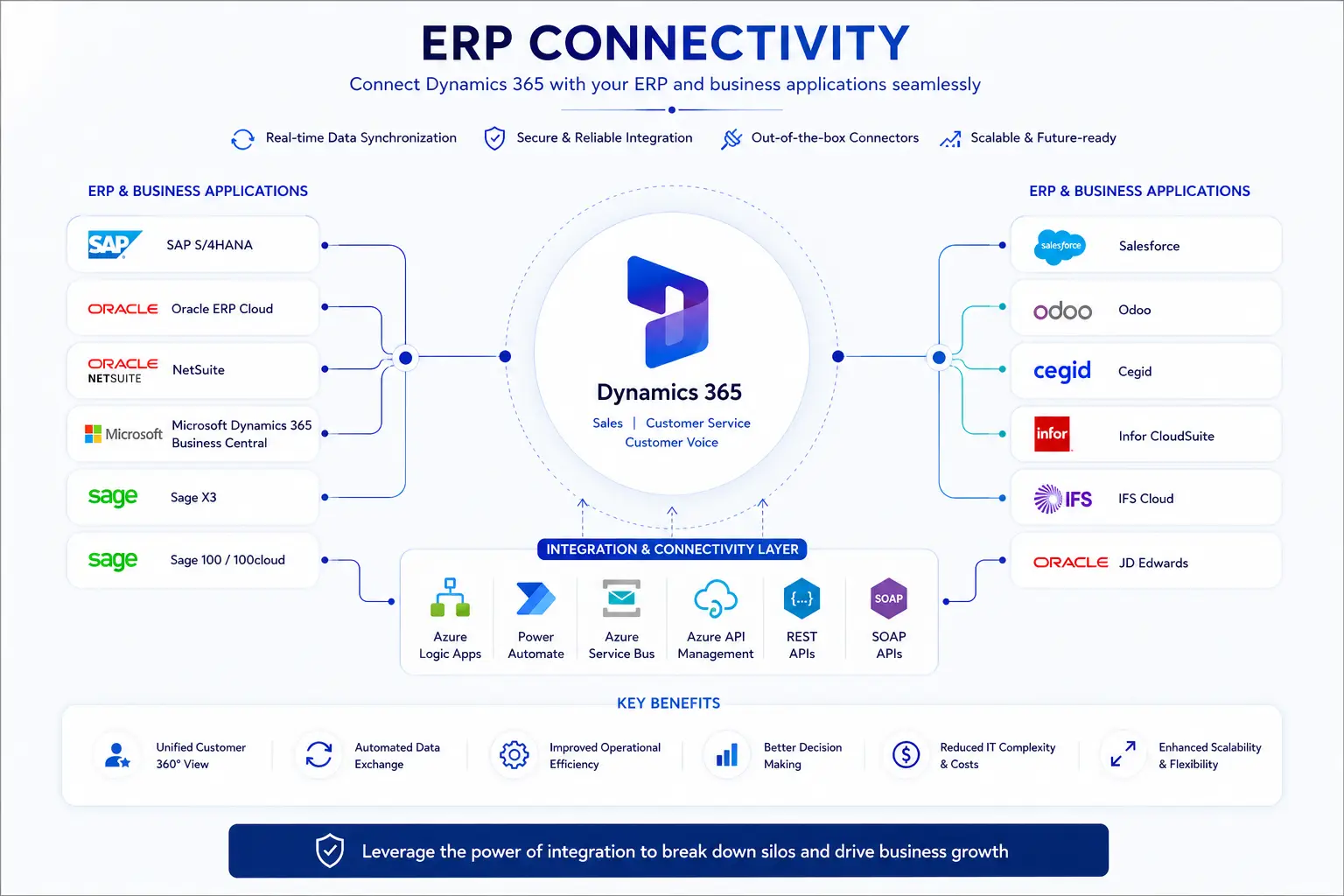
ERP integration flow connecting SAP, Oracle, Sage and other systems to Dynamics 365 and DataverseView full resolution
Examples include SAP S/4HANA, Dynamics 365 Business Central, Oracle ERP Cloud, Sage, Cegid, Odoo, NetSuite and Salesforce. Available interfaces depend on the ERP, its version and enabled options.
02
The structuring decision

One system of record for each data type

This decision defines the direction of the flow and ownership when an error occurs.

Data 01

Prospects

System of recordDynamics 365
What happens

They are sent to the ERP only when they become customers.

On conversion
Data 02

Customer legal identity

System of recordDefine together
What happens

One source is retained to prevent duplicates and discrepancies.

Based on your organisation
Data 03

Products, prices and discounts

System of recordERP
What happens

The ERP sends the information salespeople need to Dynamics 365.

Scheduled or immediate
Data 04

Approved quotes and orders

System of recordDynamics 365, then ERP
What happens

The order is sent to the ERP, which confirms successful receipt.

Upon approval
Data 05

Deliveries, invoices and receivables

System of recordERP
What happens

The ERP returns the useful status to Dynamics 365 for the teams.

Based on the business need

Example: a prospect can remain mastered in the CRM, then become an invoiced customer mastered by the ERP after the first order.

03
Our actual scope

We own the interface on the Dynamics 365 and Dataverse side

The ERP owner validates their system; Benly Consulting builds and tests the CRM side.

ERP scope

Your ERP owner or integrator

  • Exposes and documents authorised interfaces
  • Validates business rules and ERP impacts
  • Provides access and the test environment
Joint decisionsSystems of record · identifiers · security · testing · go-live
Benly Consulting scope

Dynamics 365, Dataverse and orchestration

  • Models the useful data in Dataverse
  • Builds mappings and exchange flows
  • Implements logging, alerts and CRM-side tests
04
Before the quote

Budget and timing become reliable after scoping

The estimate depends on interfaces, volumes, rules and flow criticality.

Your deliverables
  • Map of priority flows
  • System-of-record matrix
  • Responsibilities and dependencies
  • Architecture, plan and estimate

ERP owner availability and access to the interfaces are the main schedule dependencies.

05
Frequently asked questions

What to clarify before connecting the systems

How do you integrate a Dynamics 365 ERP with Dynamics 365 Sales?
Dataverse holds Dynamics 365 Sales data. Business Central connects through its Dataverse integration; Finance & Operations can use dual-write when prerequisites are met. Typically, products flow from ERP to Sales and approved orders return to ERP. Customer synchronization follows agreed ownership. Benly handles the CRM interface, alongside your ERP specialist.
How does Dynamics 365 CRM and ERP integration work?
Dynamics 365 CRM and ERP integration works by exchanging selected records through documented APIs, usually authenticated with OAuth, while Dataverse provides the CRM-side data foundation. The system of record remains defined for each data domain so the ERP and CRM do not create competing copies.
Do you need functional expertise in our ERP?
Benly Consulting owns the Dynamics 365 and Dataverse side. An internal ERP owner, your software vendor or your ERP integrator remains necessary to validate rules, open interfaces and confirm impacts inside the ERP.
Should Dataverse contain all ERP data?
No. Only data required by Dynamics 365 use cases should be exposed or replicated. Some information can remain in the ERP and be queried on demand, depending on the selected architecture.
Should every flow run in real time?
Rarely. An order or customer block may justify rapid processing, while a catalogue or reference dataset can often be synchronized at intervals. The frequency is decided flow by flow.
Which technology connects an ERP to Dataverse?
The choice depends on APIs, volumes and criticality. Power Automate suits some focused flows; Azure Logic Apps, Service Bus, API Management or Azure Functions address more demanding exchanges. The architecture is selected after reviewing the ERP and its version.
What happens when an exchange fails?
The expected treatment depends on criticality: logging, alerting, retry or controlled replay. These mechanisms are designed and tested; they should never be assumed to exist automatically.
How much does an integration cost and how long does it take?
Budget and timing depend on available interfaces, volumes, frequencies, data quality and the ERP owner’s availability. A reliable estimate is prepared after joint scoping.
Secure the first flow

Define the boundary between your ERP and Dynamics 365

Thirty minutes to identify the systems, priority data, ERP owner and first interface to assess.

Book a call