

Mandatory receiptFor all affected businesses
Dynamics 365 · Dataverse · Approved platform
Electronic invoicing: prepare Dynamics 365 for the 2026–2027 deadlines
We technically connect Dynamics 365 or Dataverse to the approved platform you have selected. The scope covers data, interfaces and status feedback — not the regulatory certification of your organisation.
SME issuing obligationWith e-reporting depending on the transaction
Our role is technicalDynamics 365 / Dataverse ↔ approved platform
01
The timeline to remember
A receipt obligation from 2026, including for SMEs
The dates differ for receiving and issuing invoices. They also depend on company size.
01
All businesses
Be able to receive electronic invoices.
02
Large and mid-sized companies
Issue electronic invoices and submit transaction and payment data when the transaction falls within e-reporting.
03
SMEs and micro-businesses
Issue electronic invoices and submit transaction and payment data when the transaction falls within e-reporting.
An SME should not wait until 2027: it must be ready to receive invoices in 2026.View the official French tax authority source.
02
A clear boundary
Benly connects Dynamics 365. The platform handles the regulatory exchange.
This division avoids confusing technical integration, accounting expertise and the role of an approved operator.
Benly Consulting
Dynamics 365 / Dataverse connection
- Map the data available in Dataverse
- API or connector interface with the selected platform
- Return statuses and rejections to the relevant screens
- Logging, tests and monitoring on the Dynamics side
Platform and partners
Compliance, transmission and third-party systems
- The approved platform validates and sends regulatory flows.
- Finance or accounting advisers validate tax rules and required details.
- The ERP integrator opens and validates interfaces in the management system.
- The client selects the platform against technical and commercial criteria.
Benly Consulting is not an approved platform — the term that now replaces “PDP”. The official listis published by the French tax authority.
03
The connection at a glance
A controlled interface between your data and the platform
Every stage has an owner. The aim is to make exchanges visible, testable and usable by business teams.
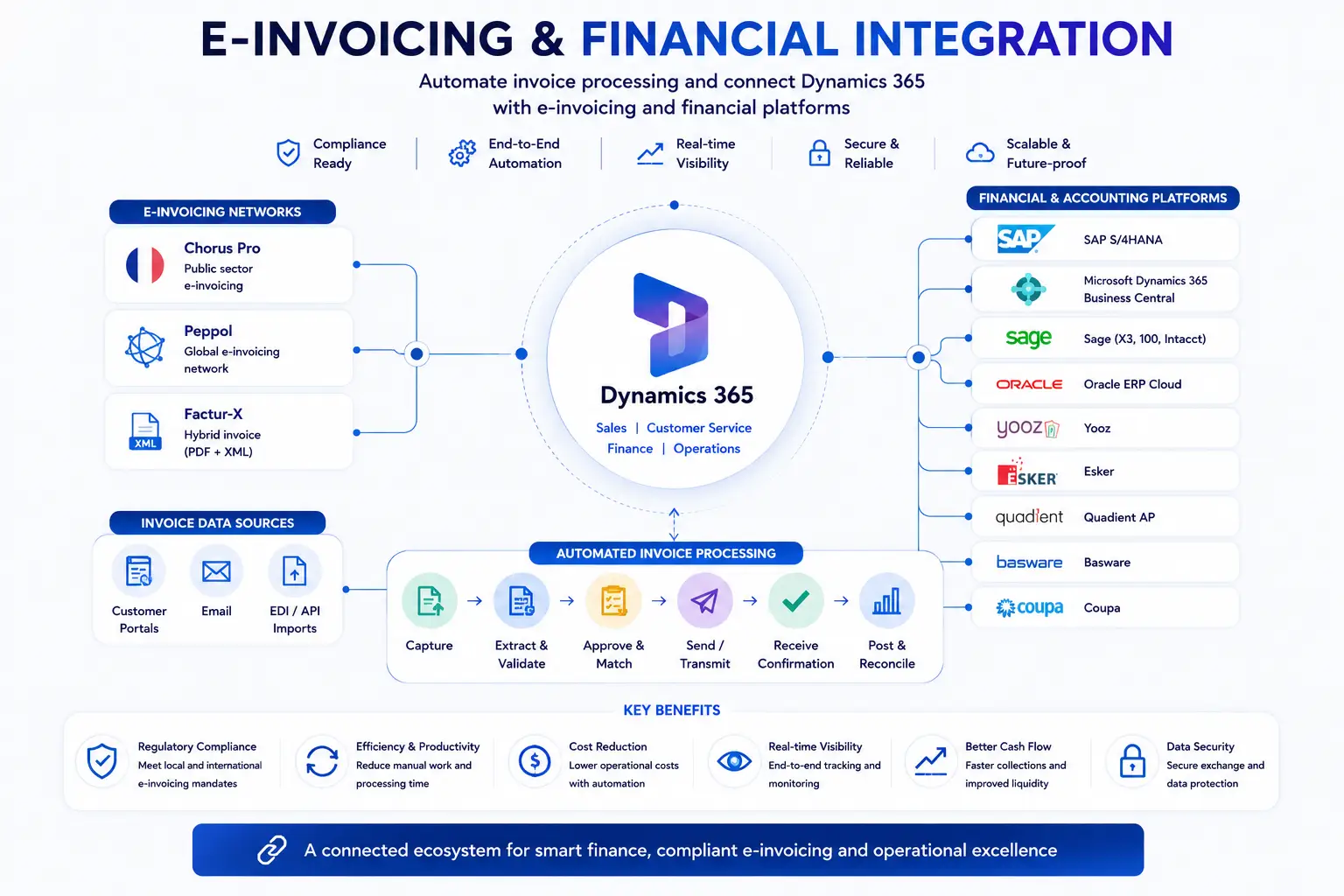 View full resolution
Validated data leaves Dynamics 365 or Dataverse for the platform.
Relevant events return to the agreed screens or processing queues.
A business error is visible to a team, not only in a technical log.
Alerting, retry and replay levels are defined during scoping.
04
Data before the connector
An interface cannot repair an incomplete invoice
Before development starts, verify that Dynamics 365 or Dataverse holds the required fields and that each one has a clearly identified source and owner.
- Presence — the field actually exists.
- Quality — the value is complete and current.
- Ownership — a team knows who maintains it.
- Mapping — the platform knows where to receive the data.
Check in the data modelFour details to anticipate
- 01
The customer's SIREN company identifier.
- 02
The delivery address when it differs from the customer's address.
- 03
The type of transaction: goods, services or both.
- 04
The statement for VAT payment on debits, where applicable.
Their applicability must be confirmed by your finance or accounting owner.View the official source.
05
A project bounded by responsibilities
Scope before promising a budget or delivery date
The effort depends on data readiness, platform APIs and the systems that actually produce the information.
Indicatively 1 to 2 weeks
Technical assessment
Flows, data, APIs, responsibilities and error cases are inventoried.
After scope approval
Joint design
The interface contract is validated with the platform and, when required, the ERP integrator.
Often 4 to 8 weeks
Connection and testing
Exchanges are built, tested and documented for Dynamics 365 / Dataverse.
Budget defined after scoping
Review your context No misleading entry price: the quote depends on the actual flows, data and interfaces available.
06
Decide without ambiguity
Frequently asked questions
Is an SME affected as early as 2026?
Yes. An SME established in France and subject to VAT must be able to receive electronic invoices from 1 September 2026. Its issuing obligation starts on 1 September 2027.
Do we need to replace Dynamics 365 or our ERP?
Usually not. The project prepares the required data and connects the existing system to the selected approved platform. Replacing the ERP or CRM is not required by default.
Is Benly Consulting an approved platform?
No. Benly Consulting only handles the technical connection between Dynamics 365 or Dataverse and an approved platform, previously known as a PDP.
Who sends invoices and e-reporting data to the French authorities?
The approved platform manages the regulatory exchanges. Within the agreed scope, Benly Consulting can map and send the data held in Dynamics 365 or Dataverse to that platform; we do not perform the regulatory submission ourselves.
Can you help us choose an approved platform?
We can compare the technical criteria affecting Dynamics 365: APIs, connectors, statuses, rejections and monitoring. Regulatory, accounting and commercial criteria must also be validated with your internal owners and candidate platforms.
How long does the connection take?
A focused technical assessment generally takes one to two weeks. The connection often takes four to eight weeks, depending on the platform APIs, data quality, selected flows and partner availability. Timing and budget are confirmed after scoping.
Your scope before the technology
Identify what Dynamics 365 really needs to exchange
A first conversation to clarify the data, platform and technical responsibilities.