

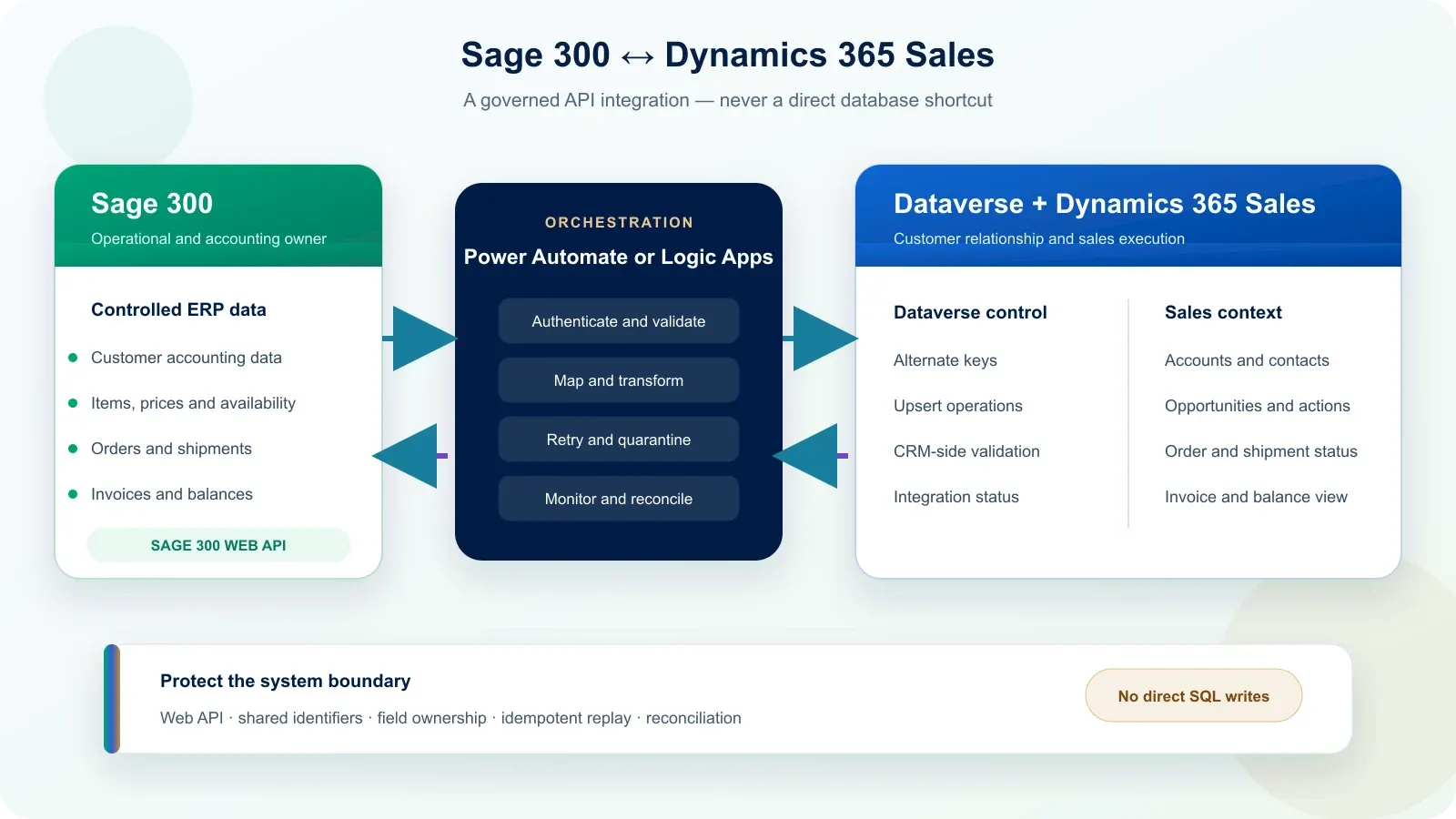
Integrate Sage 300 with Dynamics 365 Sales through the Sage 300 Web API, not by writing directly to its database. Dynamics 365 Sales stores CRM records in Dataverse; an orchestration layer validates, maps, sends and monitors only the data required by the commercial process.
Unlike Business Central, Sage 300 has no Microsoft-maintained native Dataverse integration. The project must therefore design the interface, ownership rules and recovery process explicitly.
Is there a native Sage 300 connector for Dynamics 365 Sales?
No first-party Sage 300 connector appears in Microsoft’s Power Automate connector catalogue as checked on 13 October 2026. Sage provides a Web API, while Microsoft provides the tools to call REST APIs through custom connectors, Power Automate and Azure Logic Apps.
That distinction matters. A third-party connector may accelerate a known scope, but it does not transfer responsibility for field ownership, identifiers, error handling or reconciliation. Before selecting one, verify its publisher, supported Sage 300 version, covered endpoints, limits, security model and support policy.
The common first-party building blocks are:
| Layer | Role | Responsibility |
|---|---|---|
| Sage 300 Web API | Expose supported Sage 300 records and operations | Sage 300 owner or partner |
| Custom connector or HTTP call | Describe and authenticate the API operations | Integration team |
| Power Automate or Azure Logic Apps | Orchestrate, transform, retry and monitor | Integration team |
| Dataverse Web API | Create or update CRM records | Dynamics 365 team |
| Dynamics 365 Sales | Present customer and commercial context | Sales process owner |
This is different from Business Central and Dynamics 365 Sales integration, where Microsoft supplies standard mappings and synchronization jobs through Dataverse.
Which data should move between Sage 300 and Dynamics 365 Sales?
Move only the information needed to sell, fulfil and answer customer questions; do not reproduce the Sage 300 database in Dataverse. Each data object needs one system of record, one shared identifier, one direction and an agreed synchronization frequency.
| Data object | Common owner | Useful exchange |
|---|---|---|
| Lead and opportunity | Dynamics 365 Sales | Managed in CRM; not sent to Sage 300 before qualification unless required |
| Account and contact | Decide field by field | CRM owns relationship data; Sage 300 often owns legal and accounting fields |
| Item, price and availability | Sage 300 | Sent to Dataverse when sales teams need them |
| Quote | Depends on pricing rules | CRM may prepare it; Sage 300 may calculate or approve final values |
| Confirmed sales order | Sage 300 | CRM submits a request; Sage 300 returns its order number and status |
| Shipment, invoice and balance | Sage 300 | Sent back as read-only commercial context |
“Customer” is not a single ownership decision. Dynamics 365 may own the relationship manager, segmentation and next action, while Sage 300 owns the customer number, payment terms, tax group and credit status. The mapping must state the owner of every shared field.
Why should the integration use the Sage 300 Web API?
The Sage 300 Web API is the supported boundary for programmatic record operations and applies Sage 300 security authorizations. Sage documents GET, POST, PUT, PATCH and DELETE operations, while also requiring the API authorization and the underlying permission for each record or transaction.
Direct SQL access is rejected for operational synchronization because it creates four avoidable risks:
- it can bypass application permissions and business behaviour;
- it couples the interface to internal tables that may change;
- it makes transaction validation and posting harder to control;
- it transfers database knowledge into an integration that should depend on supported contracts.
Read-only reporting against a governed replica is a separate architectural question. It does not justify using direct database writes for customers, orders, invoices or any accounting transaction.
Should Power Automate or Azure Logic Apps call Sage 300?
Use Power Automate for a small, business-owned flow; assess Azure Logic Apps when the interface is operationally critical, carries more traffic or needs stronger monitoring and network control. Both can call a REST API, but they serve different operating models.
| Decision | Power Automate | Azure Logic Apps |
|---|---|---|
| Best fit | Targeted workflow connected to Microsoft 365 and Dataverse | Managed application integration with technical operations |
| Sage 300 access | Custom connector or governed HTTP action | HTTP or HTTP + Swagger workflow |
| Monitoring | Flow runs and Power Platform administration | Azure monitoring, workflow history and broader operational tooling |
| Delivery ownership | Power Platform team | Azure or integration team |
| Typical trigger | A qualified opportunity or approved action | Schedule, API call, queue or integration event |
Azure Functions may be added only when a transformation, signature, library or validation is not cleanly handled in the orchestrator. Adding code without a concrete need increases maintenance rather than reliability.
How do you prevent duplicate customers and orders?
Store the Sage 300 identifier in Dataverse and use it as an alternate key before any upsert. Names, email addresses and postal addresses are not stable enough to identify an accounting customer or an order across two systems.
For every exchanged record, define:
- the Sage 300 key and Dataverse key;
- which system is allowed to create it;
- which fields each system may update;
- whether a missing key blocks the exchange;
- what happens after a merge, cancellation or deletion.
Dataverse upsert can create a row when the alternate key is unknown and update it when the key already exists. It is useful for synchronization, but it cannot repair an ambiguous customer policy. Initial matching and duplicate cleanup must happen before the first production run.
What happens when a Sage 300 exchange fails?
A failed exchange must be visible, attributable and safe to replay without creating a second customer or order. Silent retries are not a recovery strategy because a timeout may occur after Sage 300 has already accepted the transaction.
| Control | Why it is required |
|---|---|
| Correlation identifier | Trace one exchange across Dynamics 365, orchestration and Sage 300 |
| Idempotency rule | Prevent a replay from creating a duplicate transaction |
| Limited retry policy | Recover from temporary network or service failures |
| Quarantine path | Hold functional errors that need correction |
| Named error owner | Ensure an alert leads to an action |
| Reconciliation report | Detect missing, delayed or inconsistent records |
A 401 or 403 response requires credentials or permissions to be corrected. A rejected customer, closed period or invalid item requires a business correction. The support procedure must distinguish those cases before launch.
What must be known before estimating the integration?
An estimate requires the exact Sage 300 version and interface conditions, not simply the word “Sage”. Sage 100, Sage 300, Sage X3 and Sage Intacct have different integration mechanisms; this article and its assumptions apply to Sage 300 only.
Prepare these eight answers:
- Sage 300 version and installed product updates;
- hosting model and network path;
- whether Web Screens and the Sage 300 Web API are installed and reachable;
- available API endpoints and security authorizations;
- first data object and direction;
- average and peak volume;
- acceptable synchronization delay;
- named Sage 300 owner for endpoint and accounting validation.
Our ERP integration approach explains the division of responsibilities. Use the Dynamics 365 budget estimator for an initial order of magnitude; the integration amount is confirmed only after the Sage 300 conditions and first flow are verified.
Verified official sources
Sources checked on 13 October 2026:
- Sage 300 Help — Common Services security authorizations
- Sage 300 Help — Sage 300 2025 release notes
- Microsoft Learn — list of Power Automate connectors
- Microsoft Learn — custom connectors overview
- Microsoft Learn — use upsert with Dataverse
- Microsoft Learn — call REST APIs from Azure Logic Apps with HTTP + Swagger
Frequently asked questions
Is there a native Sage 300 connector for Dynamics 365 Sales?
No first-party Sage 300 connector appears in Microsoft's Power Automate connector catalogue as checked on 13 October 2026. The usual route is the Sage 300 Web API, called through a custom connector, Power Automate, Azure Logic Apps or a controlled integration service.
Can Sage 300 and Dynamics 365 Sales share customer records?
Yes, but one system must own each customer field and both systems need a stable shared identifier. Dataverse alternate keys and upsert operations can prevent duplicate creation. Legal identity, credit rules and accounting status commonly remain governed by Sage 300.
Should the integration read the Sage 300 database directly?
No for an operational integration. Direct database access bypasses Sage 300 API permissions and application behaviour, couples the interface to internal tables, and increases upgrade and support risk. Use the Sage 300 Web API, with a Sage specialist validating supported endpoints and accounting rules.
Is Power Automate enough for a Sage 300 integration?
Power Automate can suit a small number of controlled, non-blocking flows. Azure Logic Apps is generally better when volumes, monitoring, network controls or recovery requirements are higher. The choice follows measured traffic and criticality; it should not be made from the product name alone.
Can Benly Consulting configure Sage 300 itself?
Benly Consulting delivers the Dynamics 365, Dataverse, mapping and orchestration scope. Your Sage 300 administrator, Sage partner or ERP specialist remains responsible for the Sage environment, Web API availability, permissions, endpoint validation and acceptance of accounting behaviour. This split keeps each specialist accountable for the system they control.
How much does a Sage 300 and Dynamics 365 integration cost?
The estimate depends on the Sage 300 version, accessible endpoints, number of data objects, direction, volume, delay and recovery requirements. Benly Consulting does not publish an artificial fixed amount for an unknown interface. Use the estimator, then confirm the scope with both CRM and Sage owners.