Business process automation

Reduce manual work without launching an oversized project

We start with a concrete process — an approval, a shared file or reporting — then select the right Microsoft building blocks.

01
Before discussing tools

Does your working day look like this?

A process is worth assessing when it is frequent, repetitive, measurable and sufficiently stable. These pain points are often good starting signals.

01

The shared Excel file becomes a source of conflict

Three people edit it, versions circulate and nobody knows which one is authoritative.

Duplicate entry and fragile data
02

An approval waits several days for the right person

The request remains in an inbox because the manager is absent or travelling.

Slow decisions and manual reminders
03

Reporting is rebuilt manually every month

Data is copied, reconciled and corrected before it can be presented.

Time lost before every decision
04

A paper form is re-entered at the end of the day

Field information arrives late, sometimes incomplete, and has to be checked again.

Double entry and poor traceability

Do you recognise one of these situations?The best first project is not necessarily the most visible. It is often the one with a repetitive workload and rules that are already known.

02
Quick assessment

Which process should you automate first?

Start by measuring the annual workload. The result is not a guaranteed saving; it only quantifies the effort currently spent on the process.

The formulaFrequency × people × minutes × weeks ÷ 60
  • The process is frequent
  • The rules are sufficiently stable
  • The current workload can be measured
Indicative calculatorMeasure the current workload
Estimated annual effort783 hoursapproximately 65 hours per month

20 × 5 × 10 × 47 ÷ 60 = 783 hours

This estimate measures gross workload. The realistically automatable share is validated during scoping.

03
An end-to-end architecture

From collection to action

Power Apps, Forms, Excel, SharePoint, Teams, APIs or an ERP feed the process. Power Automate, Azure Logic Apps and Azure Functions orchestrate processing; Dataverse can centralize and secure the data, then Power BI, Copilot Studio and business applications present information and trigger useful actions.
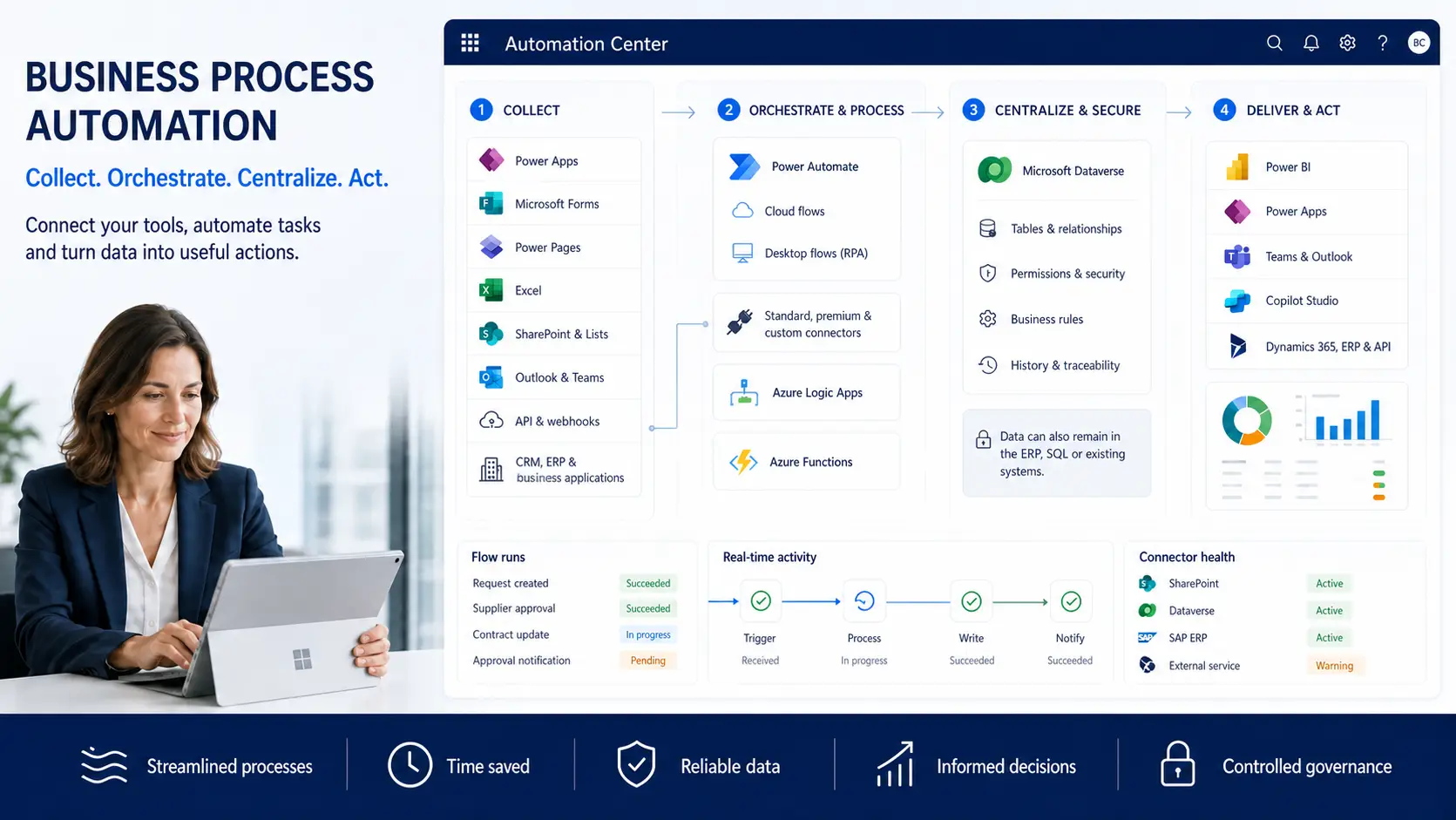
Power Platform automation flow: data collection, orchestration, Dataverse and reporting
From data collection to business decisions and actions.Open full screen
04
The point to check before the quote

One connector can change the licensing model

Cost does not depend only on the number of screens. It also depends on data sources, flow type, how the flow is triggered and the users who run it.

SQL, Dataverse, some HTTP actions or a custom connector can move the scenario into premium licensing. This must be identified before the build, not after the invoice.

View the official Microsoft FAQ
01
Connectors and data

Standard, premium, on-premises gateway, API or custom connector.

02
Trigger mode

Automated, scheduled, instant or application-triggered flow.

03
People involved

Flow owner, users who trigger it and the population covered.

04
Licensing model

User licence, existing entitlements or Process licence depending on the scenario.

The final recommendation is based on the exact scenario and the licences already held by the company.

05
A controlled first scope

What a scoped first automation includes

The aim is to launch a useful, maintainable scope without hiding dependencies that could expand the project.

  1. 01
    Scope

    Process, people, rules, exceptions and data.

  2. 02
    Build

    Application, flow or reporting for the selected scope.

  3. 03
    Test

    Business scenarios, permissions, errors and user validation.

  4. 04
    Hand over

    Documentation, knowledge transfer and points of attention.

06
Prevent rather than repair

Without a framework, a useful application can become a new risk

Ease of creation does not guarantee ownership, maintenance or data quality. Governance should remain proportionate to the project, but it should not be postponed.

  • Environments and permissions identified
  • Business owner and technical owner known
  • Rules, dependencies and handover documented
At firstA useful solution

One team saves time and wants to expand usage quickly.

As usage growsCopies and dependencies appear

Owners, data and connections become difficult to track.

Over timeNobody knows which version is authoritative

Maintenance becomes risky and every change costs more.

07
Frequently asked questions

Objections to address before automating

Do we need Dynamics 365 to use Microsoft Power Platform?
No. Power Apps, Power Automate and Power BI can be used without Dynamics 365. They can connect to Microsoft 365 and other sources, subject to the required connectivity, security and licences.
Will our teams be able to maintain the applications?
Yes, that is the objective for routine changes. The solution should be documented, handed over to an owner and built with understandable rules. Architecture, security or integration changes may still require specialist support.
How much does a business application really cost?
The budget depends on the process, screens, data, connectors, user population, security and environments. An estimate is prepared once the scope is clear. Microsoft licences are priced separately after checking the exact use case.
How do we choose the first process to automate?
Start with a frequent, sufficiently stable process involving several people and a measurable workload. A process that is still unclear or constantly changing should be clarified before it is automated.
Can a first automation really be delivered in 3 to 4 weeks?
Yes, for a focused scope with available stakeholders, approved business rules and the required access. The timeframe is indicative and becomes firm after the process, data and dependencies have been scoped.
One process at a time

Identify your first useful automation

A 30-minute conversation to check the process, volume, people, data and licensing constraints.

Book a call