

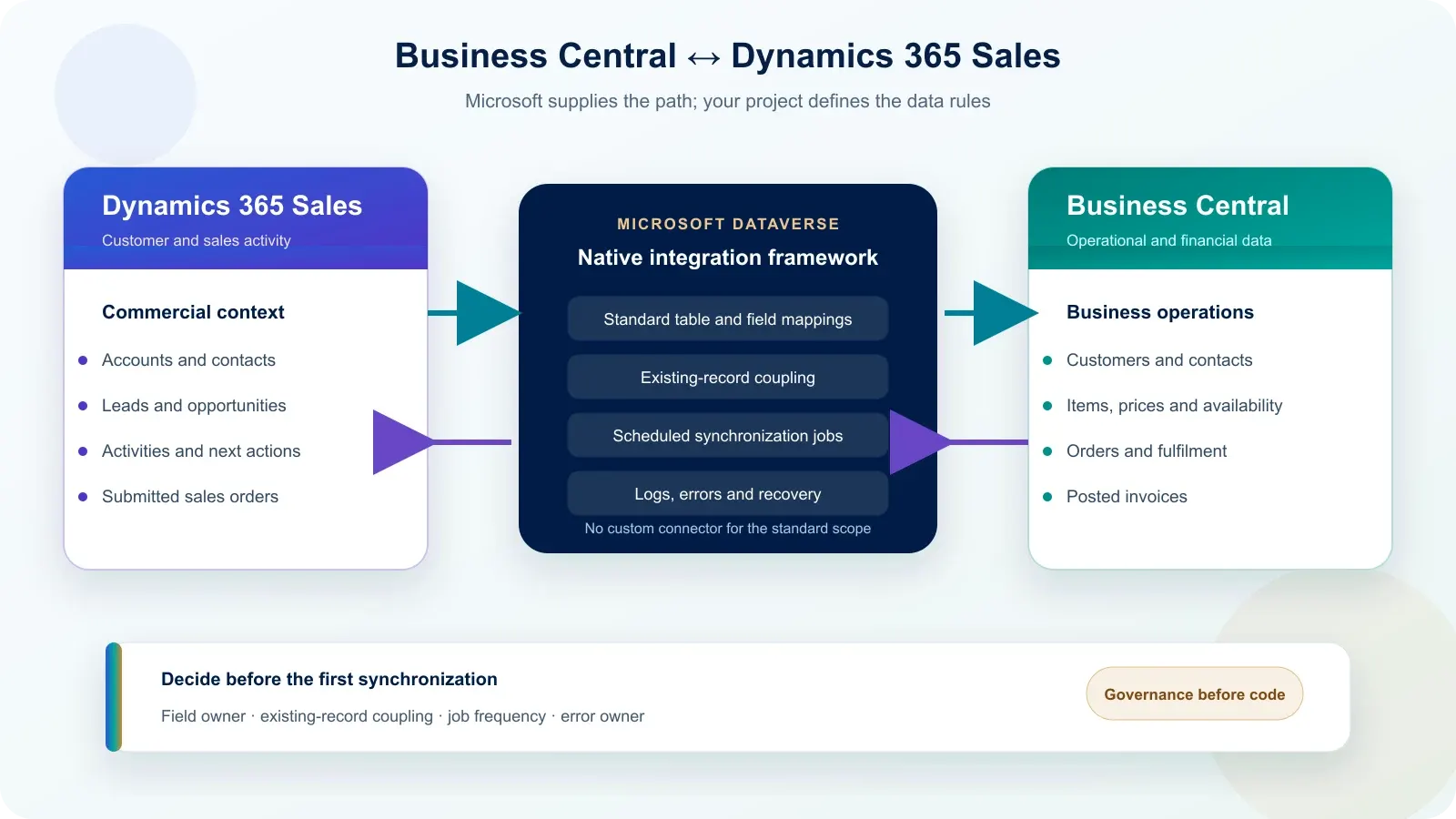
Business Central connects to Dynamics 365 Sales through Microsoft Dataverse using an integration framework supplied and maintained by Microsoft. For the standard online scope, there is no custom connector to build. The implementation effort moves instead to data ownership, record coupling, synchronization schedules, security, monitoring and recovery decisions.
Does Business Central need a custom connector for Dynamics 365 Sales?
No custom connector is required for the standard online integration between Business Central and Dynamics 365 Sales. Microsoft provides assisted setup, a Business Central integration solution, standard table and field mappings, record coupling and synchronization jobs through Dataverse. Custom code becomes relevant only when the required data model or process extends beyond that standard scope.
This distinction changes the project. The technical route already exists, but it does not decide which application may update a customer’s legal name, whether existing accounts match existing customers, how often prices must refresh or who resolves a failed synchronization. Those decisions determine whether the native integration stays reliable after go-live.
What does the native Business Central integration actually synchronize?
The native integration synchronizes selected records through mappings, not entire databases. Microsoft supplies standard mappings for shared master data and sales documents, while filters and synchronization directions control what travels. The useful scope is therefore deliberate: expose what sellers need in Dynamics 365 Sales without copying every operational or financial record from Business Central.
| Business Central record | Dynamics 365 Sales / Dataverse record | Standard direction available |
|---|---|---|
| Salesperson / Purchaser | User | Dataverse → Business Central |
| Customer | Account | Bidirectional |
| Contact | Contact | Bidirectional |
| Currency | Transaction Currency | Business Central → Dataverse |
| Item or Resource | Product | Both directions, subject to mappings and filters |
| Customer Price Group and Sales Price | Price List and Product Price | Business Central → Dynamics 365 Sales |
| Sales Order | Sales Order | Optional bidirectional synchronization |
| Posted Sales Invoice | Invoice | Business Central → Dynamics 365 Sales |
The list is not a recommendation to activate every mapping. Orders depend on customers, currencies, units of measure, price groups and products being coupled first. Microsoft also applies filters and setup options to several mappings. The initial scope should therefore follow one real lead-to-cash process rather than an indiscriminate “synchronize everything” instruction.
Which system should own each field?
Every shared field needs one declared owner, even when Microsoft supports bidirectional synchronization. Bidirectional means that changes can travel both ways; it does not decide which change is correct. A field-by-field ownership matrix prevents a late CRM edit from overwriting verified ERP data, and prevents operational values from becoming uncontrolled sales inputs.
| Data group | Typical owner | Recommended rule |
|---|---|---|
| Legal name, billing address, tax and payment data | Business Central | Publish approved operational values to Sales |
| Lead source, opportunity stage, next action and activities | Dynamics 365 Sales | Keep the commercial process in Sales |
| Primary email, phone and shared identity fields | One named application | Never leave ownership implicit or rely on the latest edit |
| Item number, base unit, price and availability | Business Central | Make ERP values available to sellers |
| Submitted order versus fulfilment status | Shared process | Sales submits; Business Central fulfils and returns status |
| Posted invoice and receivable information | Business Central | Expose useful status without moving accounting ownership |
This matrix is a design recommendation, not a Microsoft default. A company may choose a different owner because of its operating model. What matters is that each mapped field has a direction, an authorized editing role, a conflict rule and a documented response when the value differs between systems.
Why couple existing records before the first synchronization?
When both applications already contain data, existing records should be coupled before recurring synchronization starts. Coupling links one Business Central customer, contact or item to its corresponding Dataverse row. Without that link, a job allowed to create uncoupled records can produce a second account or customer instead of recognizing the record already present.
Microsoft states that a full synchronization ignores coupling and is normally used when only one solution contains data. If Business Central and Dynamics 365 Sales are both populated, start by profiling duplicates, defining match criteria, reviewing ambiguous matches and coupling a controlled sample. Run the first synchronization only after that sample produces the expected updates.
- Count active customers, accounts, contacts, products and currencies in both systems.
- Choose stable matching fields and rank them by reliability.
- Resolve records with no unique match instead of forcing automatic coupling.
- Couple prerequisites first, such as users, currencies and units of measure.
- Test synchronization direction on a small, reversible sample.
Do not disable “Sync. Only Coupled Records” without understanding the consequence. Microsoft documents that, for a bidirectional customer/account mapping, uncoupled rows can create records in the destination on both passes. That behaviour is useful for a clean deployment, but risky when two established datasets have not been reconciled.
How often does Business Central synchronize with Dynamics 365 Sales?
The standard synchronization is scheduled and does not guarantee real-time consistency. Microsoft’s default Dataverse and Sales job queue entries commonly check every 30 minutes, and the interval can be changed. Subsequent runs process records modified after the last successful job, so the required business latency should be agreed for each mapping rather than assumed globally.
| Requirement | Standard option | Decision to make |
|---|---|---|
| Accounts, contacts and currencies | Scheduled job queue entries, commonly every 30 minutes | Is this delay acceptable for sellers and operations? |
| Item availability | Optional automatic job, documented at 30 minutes | Does the sales promise require fresher inventory? |
| One urgent record | Manual “Synchronize Now” | Who may trigger it and which side wins? |
| Immediate access without copied data | Virtual tables or APIs to assess separately | Is live access worth the added dependency and design work? |
Some jobs can move to “On Hold Due to Inactivity” after repeated runs with no changes. Microsoft notes that a Business Central change can reactivate an affected job, while a Dataverse change does not necessarily do so. Testing must therefore cover changes initiated from both applications, not only the ERP-to-CRM direction.
What breaks after the native connector is enabled?
Most failures occur around the native integration rather than inside its transport mechanism. Missing permissions, uncoupled dependencies, conflicting edits, one-sided deletions, filters and custom mapping errors are the recurring causes. Business Central exposes the Integration Synchronization Log and Integration Synchronization Errors pages, but a log only helps when someone owns the response.
| Failure | Typical signal | First action |
|---|---|---|
| Currency or unit of measure is not coupled | Customer, item or order fails | Couple the dependency, then retry |
| Integration user lacks a privilege | Dataverse permission error | Correct the assigned security role |
| Record was deleted in only one application | Coupled record error | Decide whether to recreate, uncouple or retire it |
| Same field changed in both applications | Conflict or unexpected overwrite | Apply the declared field owner and direction |
| Dataverse environment is in administration mode | Synchronization stops | Restore an operating mode compatible with synchronization |
| Custom table or field mapping is incompatible | Repeated mapping failure | Review data types, permissions, filters and extension logic |
Before go-live, define four operational roles: who monitors failures, who corrects CRM data, who corrects Business Central data and who authorizes a mapping change. Also agree a maximum unresolved-error age. Otherwise, the integration can remain technically active while business-critical records quietly stop moving.
How is this different from integrating SAP with Dynamics 365?
Business Central starts with a Microsoft-maintained integration path; a SAP project starts by choosing and designing the integration path. Business Central therefore shifts more effort toward coupling, ownership and standard mappings. SAP adds interface, connector and middleware choices, although both projects still require the same discipline around systems of record, monitoring and recovery.
| Design question | Business Central | SAP |
|---|---|---|
| Standard transport | Built into the Microsoft ecosystem through Dataverse | Selected for the specific SAP landscape and interfaces |
| First project decision | Data ownership and record coupling | Interface availability, architecture and data ownership |
| Default cadence | Scheduled Business Central job queues | Designed per interface and business requirement |
| Custom build | Usually unnecessary for standard mappings | Often includes mapping, transformation or orchestration work |
| Shared obligation | Monitor failures and define recovery | Monitor failures and define recovery |
For the interface-led model, see our guide on integrating SAP with Dynamics 365 without duplicating data. The comparison matters because copying a SAP architecture onto Business Central can add avoidable complexity, while treating Business Central as “plug and play” ignores the data decisions that actually control the outcome.
What must be decided before the integration can be estimated?
A credible estimate needs eight decisions before anyone assigns effort. The native connector reduces transport development, but it does not remove data analysis, cleanup, coupling, security, custom mappings, testing or cutover. Until those elements are known, a project figure would be a guess rather than a useful budget reference.
- Are Business Central and Dynamics 365 Sales online, and are they in compatible tenants and environments?
- Which Business Central companies and Dataverse environment are in scope?
- Which standard tables and documents are genuinely needed by users?
- Does each application already contain customers, contacts, products or orders?
- Which application owns every shared field and conflict decision?
- Which custom tables, fields, filters or extensions must be included?
- What delay is acceptable for each flow, and is scheduled synchronization sufficient?
- Who owns permissions, monitoring, error correction, retry and cutover approval?
Our Dynamics 365 ERP integration approach explains how these responsibilities are separated. For a nonbinding budget orientation, use the Dynamics 365 project estimator; Business Central licences and any work performed inside the ERP remain separate from Benly Consulting’s Dynamics 365, Dataverse and integration scope.
Official Microsoft sources
All product claims on this page were checked against Microsoft Learn on 13 October 2026. The sources below document the native Sales connection, standard mappings, coupling, scheduled jobs, default 30-minute frequencies and synchronization-error handling. Product behaviour can change by Business Central version, deployment model, enabled options and later Microsoft updates.
- Integrating Business Central with Dynamics 365 Sales — checked 13 October 2026.
- Synchronizing Business Central with Microsoft Dataverse — checked 13 October 2026.
- Couple and synchronize records — checked 13 October 2026.
- Scheduling synchronization jobs — checked 13 October 2026.
- Troubleshoot synchronization errors — checked 13 October 2026.
- Use Dynamics 365 Sales from Business Central — checked 13 October 2026.
Frequently asked questions
Is the Business Central and Dynamics 365 Sales connector native?
Yes. For online environments, Microsoft provides the Business Central integration through Dataverse, including assisted setup, the integration solution, standard table and field mappings, coupling and job-queue synchronization. A custom connector is not required for the standard scope; extensions may still be needed for custom tables, custom fields or nonstandard process rules.
Does the standard integration run in real time?
No. Microsoft’s standard data synchronization runs through scheduled job queue entries and does not guarantee real-time consistency. Many default jobs check every 30 minutes. When a process requires immediate access rather than replicated data, Business Central virtual tables, APIs or event-based patterns should be assessed separately.
How do we prevent duplicate accounts and customers?
Couple existing Business Central customers to existing Dataverse accounts before recurring synchronization, using explicit or match-based criteria. Microsoft states that full synchronization ignores coupling and is normally intended when only one solution contains data. Review ambiguous matches manually and test a controlled sample before creating any missing records.
Which system should own customer data?
There is no safe universal answer. Business Central usually owns legal, billing and financial attributes, while Dynamics 365 Sales owns relationship, opportunity and activity data. Shared identity fields need one declared owner per field. Bidirectional capability does not remove that decision; it only allows changes to travel in both directions.
What happens when synchronization fails?
Business Central records failures in Integration Synchronization Log and Integration Synchronization Errors. Common causes include missing privileges, uncoupled dependencies such as currencies or units of measure, conflicting changes, deletions in only one system and custom mapping errors. Define who investigates, corrects, retries and confirms each failed record before go-live.
Can custom fields be synchronized?
Yes, when compatible table and field mappings are added and the integration user has the required privileges. Custom fields are not automatically governed by the standard setup. Their data type, direction, transformation, dependency and error behaviour must be designed and tested; some requirements need a Business Central extension or Dataverse customization.