

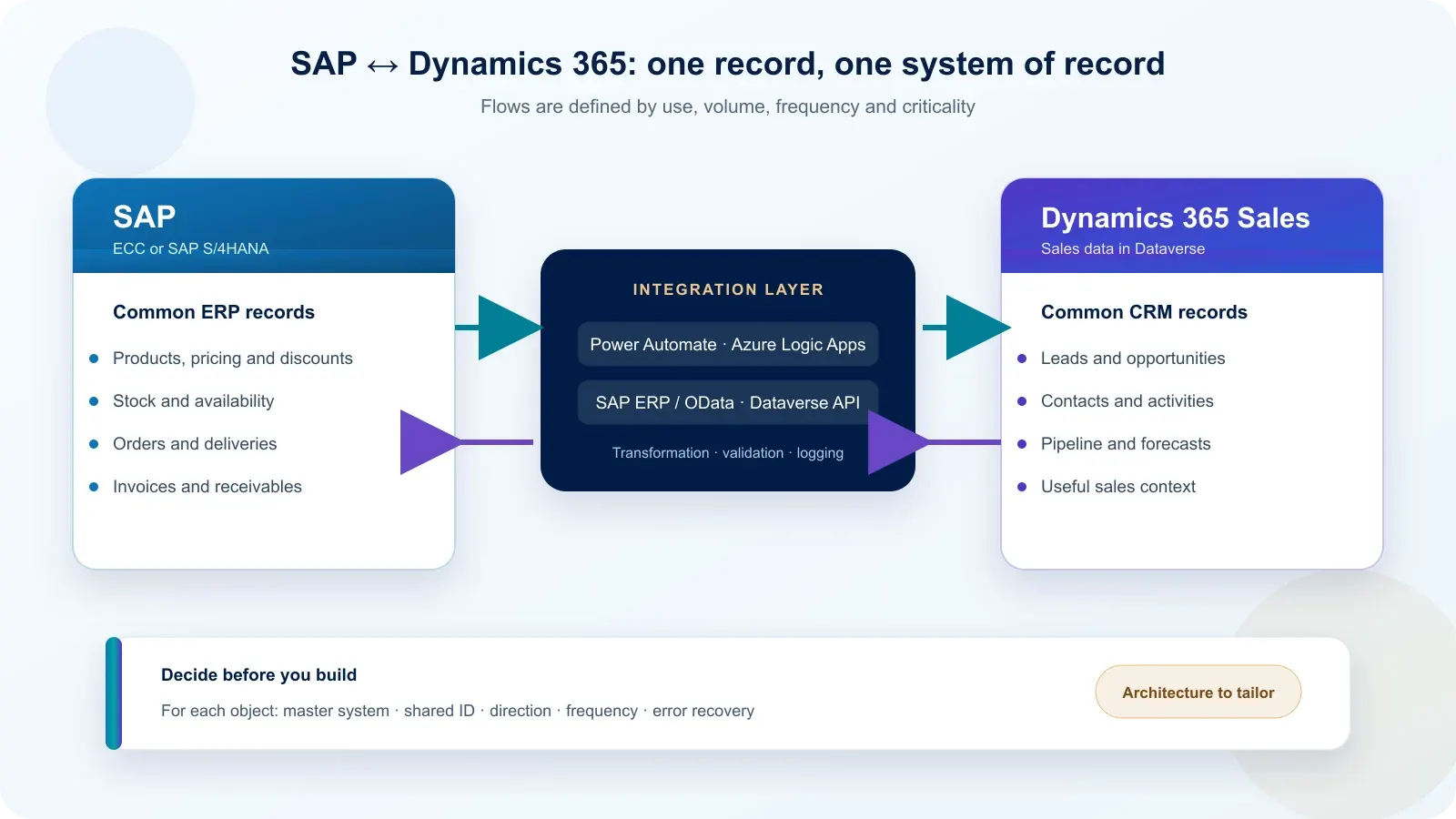
Integrating SAP with Dynamics 365 means moving only the data that is needed, in a defined direction and under the control of a system of record. The first decision is therefore not which connector to select. You must first decide where the customer, product, quotation, order and invoice originate.
Dynamics 365 Sales uses Dataverse for sales data. SAP generally remains the system of record for management data, but this allocation is not universal. It must be validated object by object with business owners and the SAP owner.
Which data should be synchronised between SAP and Dynamics 365?
The CRM does not need a complete copy of SAP. It needs the context required to sell and inform the customer. Replicating every table increases duplicates, errors and maintenance without improving sales work.
A common allocation looks like this:
| Data | Common system of record | Useful flow |
|---|---|---|
| Lead and opportunity | Dynamics 365 Sales | Created and managed in the CRM |
| Contact and sales activity | Dynamics 365 Sales | Retained in Dataverse; sent to SAP only when required |
| Customer legal identity | To be decided | One owner and one shared identifier |
| Product, price, discount and stock | SAP | SAP sends the CRM what sales teams need |
| Quotation | Dynamics 365 or SAP, depending on the process | Ownership depends on pricing and approval rules |
| Approved order | SAP | The CRM sends the request; SAP confirms creation |
| Delivery, invoice and receivables | SAP | SAP sends the CRM a status that teams can use |
This table is a starting point, not an automatic rule. A company may, for example, manage quotations in Dynamics 365 while leaving final price calculation and order creation to SAP. The priority is to prevent two systems from changing the same data without an arbitration rule.
How can duplicates between SAP and Dataverse be prevented?
Every synchronised object needs a stable key shared by both systems. A company name or address is not enough: these values change, are entered differently and quickly create several records for the same customer.
For each data object, scoping must define:
- its system of record;
- its SAP identifier and Dataverse identifier;
- the authorised direction for creation and updates;
- the fields that are genuinely exchanged;
- how deletion, merging or rejection is handled.
Dataverse provides alternate keys and the upsert operation to find an existing record before creating or updating it. These mechanisms reduce duplicates, but they do not replace a clear rule on data ownership.
Real time, asynchronous processing or batches?
The right frequency is the one required by the business decision, not the one that sounds most modern. A synchronous operation blocks the action in progress until the remote system responds. An asynchronous operation lets each application continue and processes the exchange separately.
Synchronous processing is justified when a salesperson needs immediate information before continuing: critical availability, a credit check or an essential approval. It nevertheless creates a direct dependency on SAP, the network and the integration mechanism.
Asynchronous processing is better suited to approved orders, status changes or updates that must move quickly without blocking the user. A message queue can absorb a peak and retain exchanges until they are processed.
Batch processing remains relevant for a large catalogue, initial migration or an overnight refresh. Microsoft recommends choosing the pattern according to volume, frequency, direction and the capacity of the most constrained system. Power Automate runs asynchronously and does not guarantee real-time performance.
Which connector should be used for SAP and Dynamics 365?
The decision first depends on the SAP version and the interfaces it exposes. SAP ECC, on-premises SAP S/4HANA and SAP S/4HANA Cloud do not necessarily provide the same mechanisms or network constraints.
Microsoft documents two main connector families:
- the SAP ERP connector, based on the RFC protocol and SAP .NET Connector library;
- the SAP OData connector, suitable for SAP products that expose OData services.
Azure Logic Apps also supports SAP operations based on BAPI, RFC and IDoc. For SAP S/4HANA, SAP documents OData and SOAP APIs. Some OData APIs can respond synchronously, while others also support asynchronous processing.
Power Automate suits targeted automation with Dataverse and controlled volumes. Azure Logic Apps should be assessed for an integration that is more critical, carries higher volumes or requires a decoupled architecture. Azure Functions can complement the design when a specific transformation or rule cannot be expressed cleanly in the orchestrator.
What should happen when an exchange fails?
A failure must become visible, explainable and replayable without creating a second order. An integration that merely retries silently can turn a temporary outage into a business duplicate.
The recovery mechanism should include:
- a correlation identifier shared by SAP and Microsoft logs;
- an idempotency key to recognise a message that has already been processed;
- a limited number of automatic retries for temporary errors;
- a quarantine queue for messages that require correction;
- an alert sent to an identified owner;
- a reconciliation check to detect missing exchanges.
A technical error and a business error are not corrected in the same way. A network outage may be retried; a customer without a mandatory identifier must be corrected before replay. Testing must cover both categories, not only the happy path.
Who is responsible on each side of the integration?
Benly Consulting works on Dynamics 365, Dataverse and orchestration; the internal operation of SAP remains the responsibility of your SAP specialist. This boundary avoids claiming functional ERP expertise that is outside the CRM scope.
Benly Consulting can scope Dataverse objects, field mappings, flows, logging and CRM-side testing. Your SAP owner, software vendor or SAP integrator must expose and document the interfaces, validate authorisations, confirm ERP rules and lead testing in SAP.
Shared decisions cover systems of record, identifiers, security, error cases and acceptance criteria. Without an available SAP contact, any schedule or budget estimate would remain artificial.
Where should you start before requesting an estimate?
Start with one flow that has clear business value and an available owner. Sending an approved order from Dynamics 365 to SAP and returning its number and status is often easier to control than a general synchronisation of customers and products.
Prepare six pieces of information: SAP version and hosting model, priority business object, flow direction, average and peak volume, acceptable delay, and the name of the SAP owner. These details make it possible to compare Power Automate, Azure Logic Apps and available SAP interfaces without choosing a tool blindly.
Our ERP integration with Dynamics 365 and Dataverse page explains the responsibility split. To obtain an initial order of magnitude without assuming the complexity of SAP, use the Dynamics 365 budget estimator.
Verified official sources
Sources consulted on 3 September 2026:
- Microsoft Learn — Power Platform and SAP integration
- Microsoft Learn — access SAP from Azure Logic Apps
- Microsoft Learn — choose a Power Platform integration pattern
- Microsoft Learn — synchronise data with Dataverse
- SAP Help — SAP S/4HANA sales APIs
Frequently asked questions
Should Dataverse contain all SAP data?
No. Dataverse should receive the data required by CRM processes, not a complete copy of SAP. Saleable products, relevant prices, order statuses or receivables may be exposed when needed, while detailed accounting and logistics data generally remain in SAP.
Is Power Automate enough to connect SAP to Dynamics 365?
Power Automate can suit targeted flows with moderate volumes. Azure Logic Apps is better suited when the integration requires higher throughput, stronger monitoring, decoupling or network control. The decision also depends on the SAP interfaces that are actually available and on the process criticality.
Can an on-premises SAP system be connected?
Yes, subject to a supported version, a properly authorised SAP account and compliant connectivity. Depending on the architecture, the SAP connector may use RFC, BAPI or IDoc and may require an on-premises data gateway or dedicated Azure network configuration.
Must SAP and Dynamics 365 be synchronised in real time?
No. Real time is useful only when a business action needs an immediate response, such as availability or a blocking check. Catalogues, delivery statuses and invoicing information can often move asynchronously or in batches, with monitoring and recovery.
Who works on the SAP side during the project?
Benly Consulting scopes and delivers the Dynamics 365, Dataverse, orchestration and CRM testing work. Your SAP owner, software vendor or SAP integrator remains necessary to expose interfaces, validate ERP rules, provide authorisations and lead acceptance testing in SAP.