

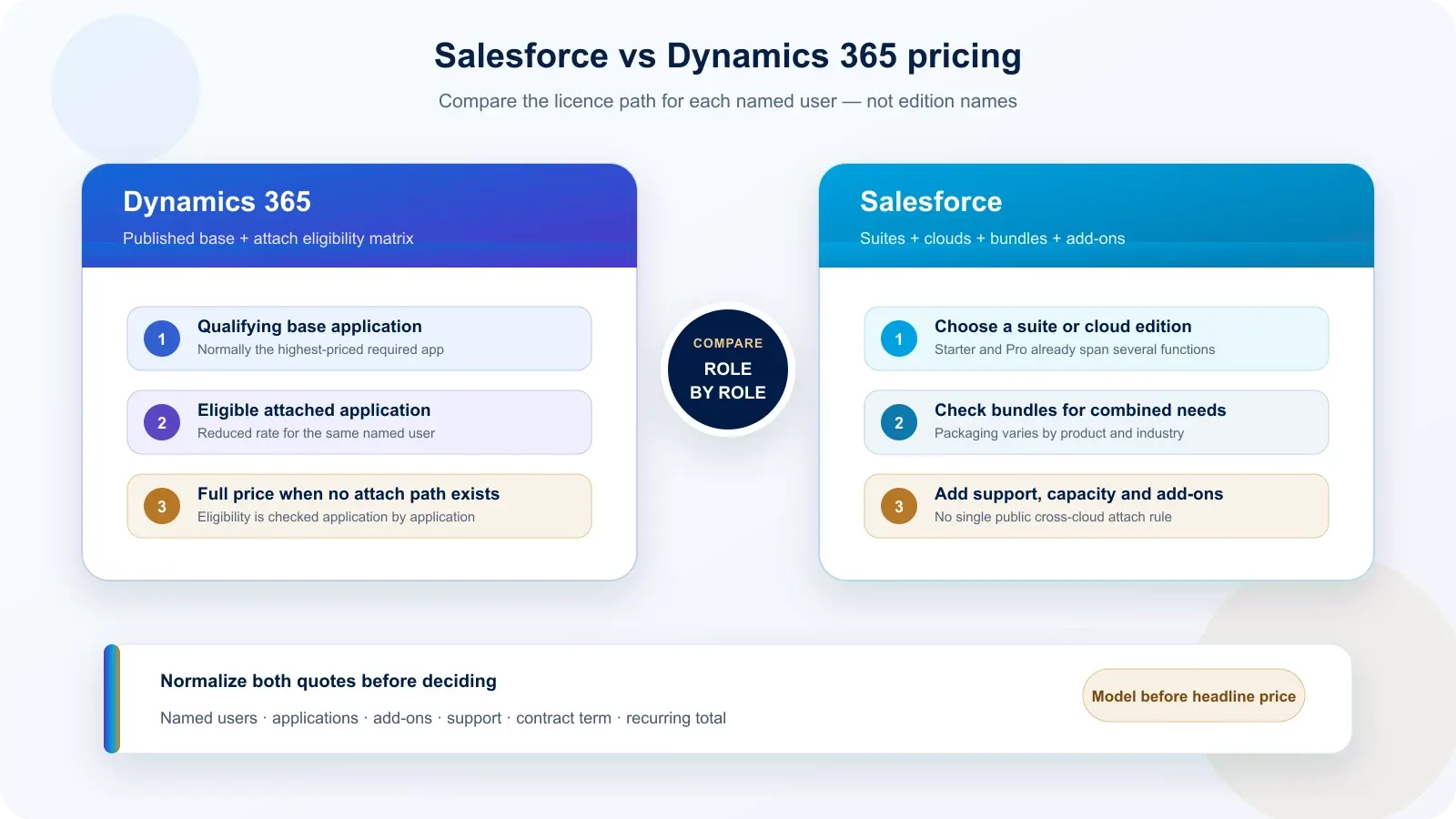
Dynamics 365 and Salesforce both charge mainly by named user, but they package additional capabilities differently. Microsoft publishes a base-plus-attach matrix for eligible Dynamics 365 applications. Salesforce publishes suites, separate cloud editions, bundles and add-ons, without one universal public attach rule across its catalogue.
That difference changes the calculation when one person needs more than sales. It does not prove that one vendor is always cheaper.
How are Salesforce and Dynamics 365 licensed?
Both vendors start with a named-user subscription, then add edition, product and contract choices around it. The monthly figure is therefore only one line in the budget; the licence path for each role determines the recurring cost.
| Question | Dynamics 365 | Salesforce |
|---|---|---|
| Primary unit | Named user per application | Named user per suite, cloud or product |
| Entry packaging | Sales Professional, Enterprise or Premium | Starter Suite, Pro Suite, Sales Core, Advanced or Max |
| Multiple applications | Published base-plus-attach eligibility matrix | Suites, separate clouds, bundles and add-ons |
| Billing shown publicly | Monthly rate, commonly paid yearly | Monthly rate; annual billing or contract on most higher tiers |
| Extra support | Depends on agreement and offer | Standard included; Premier publicly listed as a percentage of net licence fees |
The pricing snapshot above uses current public France and EU pages. It deliberately does not claim feature equivalence between editions.
What does base plus attach mean in Dynamics 365?
A Dynamics 365 user pays for one qualifying base application, then may add eligible applications at a reduced attach rate. Microsoft states that the highest-priced qualifying application is normally the base and publishes a matrix showing which applications can be attached.
This is a named-user rule, not an organisation-wide discount. An attach licence cannot be assigned without its qualifying base licence, and not every product combination is eligible.
A typical calculation follows this sequence:
- identify every application required by the user;
- select the highest-priced qualifying application as the base;
- check each additional application in the current attach matrix;
- use full price when no attach path exists;
- repeat the calculation for every distinct user role.
The mechanism is useful when the same employee genuinely needs Sales and another eligible Dynamics 365 application. It creates no saving for a second employee who needs only that other application.
Does Salesforce charge a full second licence?
Salesforce does not publish one universal cross-cloud attach rule, but “a second full licence every time” is too absolute. Starter Suite and Pro Suite already combine sales, service, marketing and commerce capabilities, while higher tiers, industry products and add-ons use different packaging.
The safe comparison is contractual:
| Situation | What to verify in Salesforce |
|---|---|
| Small team needing basic sales and service | Whether Starter Suite or Pro Suite already covers the required functions |
| Sales team needing advanced sales capabilities | Sales Core, Advanced or Max entitlement and limits |
| Same users needing advanced service capabilities | Combined quote, bundle or separate Service Cloud entitlement |
| Industry-specific sales and service | Whether an industry Sales & Service bundle is available |
| Extra analytics, AI or success services | Add-on price, included capacity and prerequisites |
Salesforce’s public Sales and Service pages each show cloud prices, but a procurement comparison should use the vendor quote for the exact combination. Adding two webpage prices can overstate a bundle or understate required add-ons.
Is there a minimum user count?
The standard public Sales Cloud and Dynamics 365 Sales pages checked on 14 October 2026 do not state a general minimum seat count. A five-user calculation should therefore not be doubled automatically because of an assumed ten-seat floor.
Specific offers can impose a minimum. Microsoft explicitly lists ten seats for Microsoft Relationship Sales. Salesforce add-ons, industry products and negotiated contracts may carry different conditions, so the quote must state both unit price and minimum quantity.
For a small team, ask the vendor or partner to write four items on the quote: minimum seats, billing term, renewal rule and the date until which the price is valid.
How should a five-user or ten-user budget be calculated?
Multiply each role’s complete licence bundle by the number of people in that role, not one edition by the total headcount. A salesperson, service agent, manager and occasional reader may require different entitlements.
| Step | Calculation |
|---|---|
| 1. Group users | Number of users in each distinct role |
| 2. Build each role | Base licence or suite + eligible attach licences + add-ons |
| 3. Apply conditions | Minimum quantities, annual commitment and support percentage |
| 4. Compare growth | Repeat for five users, ten users and the expected team size |
| 5. Separate services | Keep implementation, migration and integration outside subscription totals |
At a flat per-user list price, ten identical users cost twice five users. The relationship changes when minimum quantities, tiered discounts, shared capacity, transaction fees or percentage-based support enter the quote.
What is missing from the licence price?
A public licence rate does not include the work required to make the CRM usable in your organisation. Treat subscriptions and implementation as separate budgets, even when one supplier sells both.
| Cost area | Why it can change the total |
|---|---|
| Data migration | Volume, quality, history and duplicate treatment |
| Configuration | Sales process, security, automation and reporting |
| Integration | ERP, invoicing, marketing, telephony or external APIs |
| Environments and storage | Sandbox strategy, files, audit and growth |
| AI and analytics | Credits, capacity, add-ons and prerequisites |
| Support and adoption | Vendor success plan, partner support and user training |
No project amount is invented in this comparison. Use the Dynamics 365 budget estimator for Benly Consulting’s published scope assumptions and keep any Salesforce implementation quote on the same perimeter.
How should decision-makers compare the two quotes?
Normalize both quotes into one role-by-role table before comparing totals. Edition names are marketing categories; required capabilities and contractual conditions are the comparable facts.
Ask both suppliers to confirm:
- named users and permitted use for each licence;
- included applications and excluded capabilities;
- add-ons, credits, storage and environments;
- support level and response conditions;
- contract duration, renewal and price protection;
- minimum quantities and discount expiry;
- first-year and recurring totals on the same tax basis.
Our CRM & Sales approach explains the functional scope behind the Microsoft option. The guide to Dynamics 365 modules helps identify when one user actually needs more than Sales.
Verified official sources
Prices and licensing statements checked on 14 October 2026:
- Microsoft France — Dynamics 365 Sales pricing
- Microsoft — Dynamics 365 licensing guidance
- Microsoft Product Terms — Dynamics 365 licence prerequisites
- Salesforce EU — Sales pricing
- Salesforce EU — Service pricing and Success Plans
- Salesforce EU — product pricing directory
Frequently asked questions
Is Salesforce or Dynamics 365 cheaper?
Neither is always cheaper. The result depends on the edition, named users, applications, add-ons, support and contract terms. Compare a role-based bill of materials rather than one headline price. The public prices above are not evidence that two tiers provide equivalent capabilities.
What is a Dynamics 365 attach licence?
An attach licence is a reduced-price licence for an eligible second Dynamics 365 application assigned to the same named user who already has a qualifying base licence. The highest-priced qualifying application is normally the base. Eligibility must be checked in Microsoft's current licensing matrix.
Does Salesforce charge a full second licence for another cloud?
Not as a universal rule. Salesforce publishes suites that already combine sales and service capabilities, separate cloud editions, industry bundles and add-ons. Its public pricing does not expose one cross-cloud attach matrix equivalent to Microsoft's. Confirm the exact combined entitlement and price in the Salesforce quote.
Do Salesforce or Dynamics 365 require a minimum number of users?
The standard public Sales Cloud and Dynamics 365 Sales pages checked on 14 October 2026 do not state a general seat minimum. Specific offers can differ: Microsoft Relationship Sales explicitly requires ten seats, while Salesforce contracts, add-ons or industry products can have their own conditions.
Are Salesforce Core and Dynamics 365 Sales Enterprise equivalent?
No. Similar position in a pricing page does not mean identical functions, limits or included services. Compare lead and opportunity management, automation, API access, reporting, AI, storage, environments, support and the other applications each user needs before treating two editions as alternatives.
What should a CRM licence comparison include?
List every user role, required application, edition, add-on, support plan, environment, storage assumption and contract period. Separate recurring subscriptions from implementation and data work. Then test five-user, ten-user and growth scenarios using the same scope and tax basis for both vendors.